This is a practical, scoring subject, and the objective section is where careful practice pays off fastest. On this page you will find a hand-picked set of NIOS Class 12 Computer and Office Applications 631 Objective Type Questions with answers for the 2026 session, prepared after studying past papers and reading the complete NIOS textbook for the course. Real samples from every format sit below, so you can judge the quality before you ask for the full set.
Written by Prateek Talwar · Reviewed by Jyoti Sharma, Senior NIOS Counsellor · Last updated 17 July 2026
We have kept the language plain and the answers short, because most learners revising the paper want a clear response and a quick reason rather than long theory. Every sample below carries the correct answer with a brief explanation, so you understand why it is right instead of learning it by rote. Look through the samples first, then decide.
NIOS Class 12 Computer and Office Applications 631 Objective Type Questions for 2026
Also known as the Certificate in Computer and Office Applications, the 631 course runs from the basics of a computer into networking, the Internet, MS Office tools and website design. This collection pulls the most examinable ideas from every lesson into three objective formats, giving you a resource you can finish across a few focused sittings and still feel ready for the objective section of the paper.
The set is aligned to the current session so the coverage matches what learners can expect in 2026. If you want to see how this course sits within the wider syllabus before you start revising, our NIOS Syllabus page lays out the structure clearly, which pairs well with the topic table further down.
Chapter Wise List of Computer and Office Applications 631 Topics Covered
The full booklet covers all six lessons of the 631 course, moving from computer fundamentals through to planning and designing a website. The table below lists each lesson with its NIOS code and the specific topics it focuses on, so you can head straight to the areas you find hardest. The samples further down are drawn from several of these lessons.
| S. No. | Lesson | Chapter Name | Key Topics in This Lesson |
|---|---|---|---|
| 1 | L-1 | Basic Concepts of Computer | Hardware and software, CPU and ALU, RAM ROM and secondary memory |
| 2 | L-2 | Basics of Data Communication and Computer Networking | Delivery and accuracy, transmission media, LAN MAN and WAN |
| 3 | L-3 | Introduction to Internet | TCP/IP and WWW, e-mail and e-commerce, FTP and Telnet |
| 4 | L-4 | Office Productivity Tools Part I | MS Word interface, formatting and shortcuts, Mail Merge and Excel basics |
| 5 | L-5 | Office Productivity Tools Part II | Database and tables, fields records and primary key, queries and forms |
| 6 | L-6 | Planning and Designing a Website | HTML and site map, static and dynamic sites, navigation and web hosting |
If you would like the same lesson wise treatment for your other subjects too, our NIOS Class 12 Objective Type Questions section groups these booklets subject by subject so your revision stays tidy through the whole year.
Sample Computer and Office Applications 631 Fill in the Blanks Questions
The fill in the blanks format checks whether you remember the exact term, shortcut or value. Here are six samples drawn from more than one lesson, each with its answer and a short reason, kept word for word from the source.
Basic Concepts of Computer
Q1. A computer is a programmable machine designed to perform ______ and logical operations automatically.
Answer: arithmetic
Explanation: A computer fundamentally works on two types of operations, arithmetic and logical. Arithmetic operations involve numerical calculations, while logical operations help in decision-making.
Basic Concepts of Computer
Q2. RAM is known as ______ memory because its contents are lost when the power is turned off.
Answer: volatile
Explanation: Volatile memory retains data only while the computer is powered on. Once the system is switched off, all stored information in RAM is erased, making it temporary storage.
Data Communication and Networking
Q3. A set of rules that governs communication between devices is known as ______.
Answer: Protocol
Explanation: Protocols define how data is transmitted, received, and interpreted. They ensure that devices can communicate effectively.
Introduction to Internet
Q4. Buying and selling of goods and services over the Internet is called ________.
Answer: E-commerce
Explanation: E-commerce enables online transactions, allowing users to purchase and sell goods without physical presence. It offers convenience and access to a wide range of products.
Office Productivity Tools Part I
Q5. To save an already named document quickly, the keyboard shortcut ______ is used.
Answer: CTRL+S
Explanation: Shortcut keys streamline repetitive actions. CTRL+S directly saves changes without opening dialog boxes, ensuring that work is preserved frequently and reducing the risk of data loss.
Office Productivity Tools Part II
Q6. The unique field used to identify each record in a table is called __________.
Answer: Primary key
Explanation: The primary key ensures that each record is distinct and prevents duplication. It plays a crucial role in maintaining data accuracy and relationships between tables.
Sample Computer and Office Applications 631 True and False Statements
True and false statements are where small slips cost marks, because one word changes the meaning. Read each one slowly. These five samples span several lessons and are reproduced without any change.
Basic Concepts of Computer
Q1. RAM is a type of non-volatile memory.
Answer: False
Explanation: RAM is volatile memory, which means it loses all stored data when the power is turned off. It is used for temporary storage during processing.
Data Communication and Networking
Q2. In all cases, wireless communication is more secure and reliable than wired communication media.
Answer: False
Explanation: Wireless media are more prone to interference and security issues compared to wired media. Wired communication generally provides more stable and secure transmission.
Introduction to Internet
Q3. The World Wide Web and the Internet are exactly the same.
Answer: False
Explanation: The Internet is the infrastructure consisting of networks, while the World Wide Web is a service that operates on it. The web uses hypertext documents and browsers, whereas the Internet supports multiple services beyond just the web.
Office Productivity Tools Part I
Q4. Pressing CTRL+N creates a new document in MS Word.
Answer: True
Explanation: CTRL+N is a shortcut key used to create a new document instantly. It improves efficiency by allowing quick access without navigating through menus.
Office Productivity Tools Part II
Q5. A primary key field can contain duplicate values.
Answer: False
Explanation: A primary key is used to uniquely identify each record. Therefore, it must contain unique values and cannot have duplicates.
Sample Computer and Office Applications 631 Define the Following Questions
The define the following section gives short, exam-ready definitions of the key terms in each lesson. Here are four samples drawn from across the course, reproduced exactly as in the booklet.
Basic Concepts of Computer
Q1. Define Computer.
A computer is an electronic programmable machine that accepts data and instructions as input, processes them using arithmetic and logical operations, and produces meaningful information as output. It works automatically under the control of stored programs and performs tasks with high speed and accuracy.
Data Communication and Networking
Q2. Define Protocol.
A protocol is a set of rules and guidelines that govern the communication between devices in a network. It ensures that data is transmitted in a structured format, correctly interpreted, and properly synchronized between sender and receiver.
Introduction to Internet
Q3. Define Hypertext.
Hypertext is a method of organizing information in which text contains links to other related documents. These links allow users to move easily from one document to another, forming the basis of web navigation.
Planning and Designing a Website
Q4. Define Web Hosting.
Web hosting is the process of storing website files on a server connected to the Internet so that the website can be accessed by users at any time.
Sample Pages from the Computer and Office Applications 631 Booklet
To show you the format and print quality, here are a few sample pages from the actual booklet. The full version keeps this same clean layout across all six lessons, so revision stays comfortable on both phone and paper.
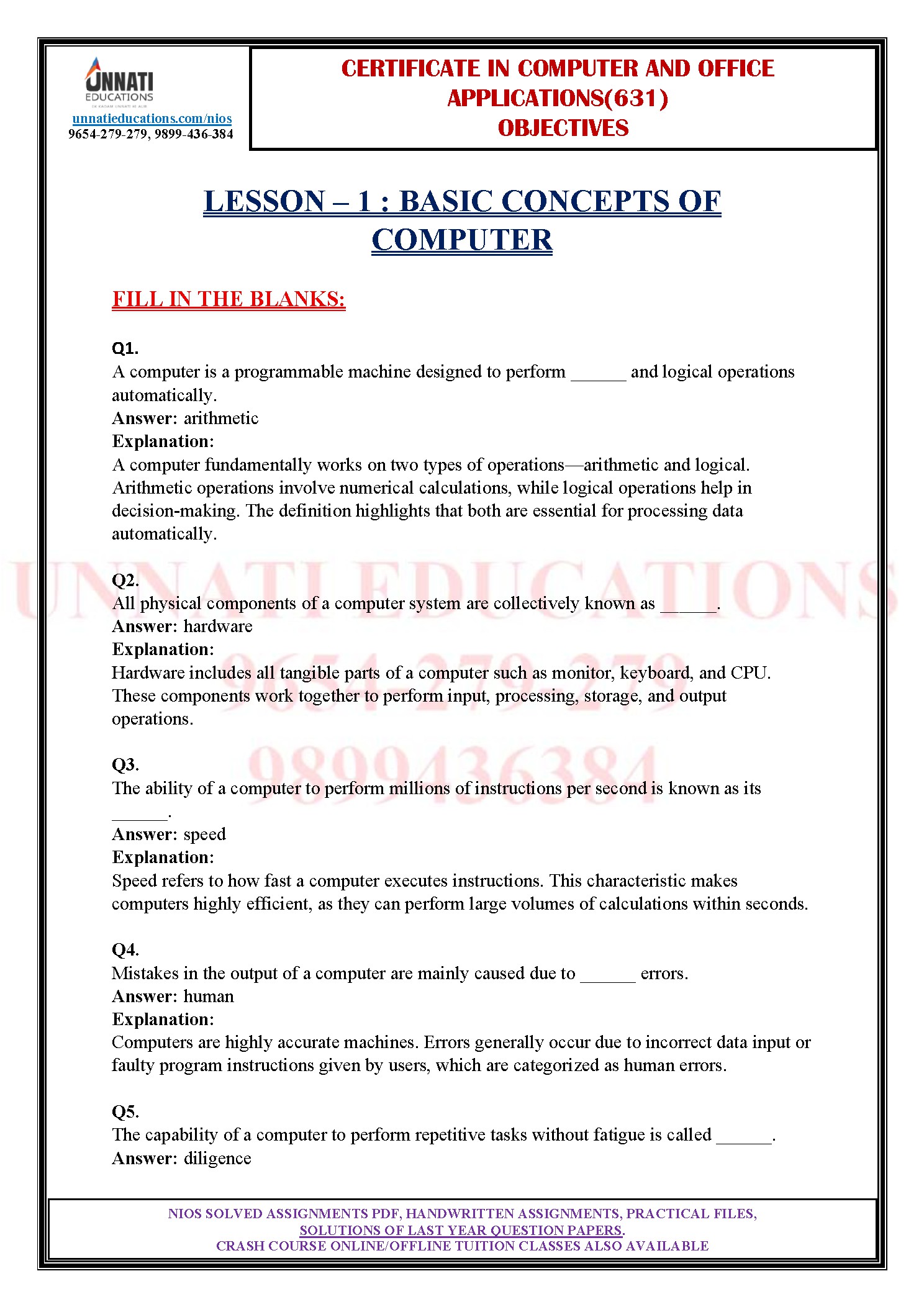
Fill in the blanks sample page

True and false sample page

Define the following sample page
Want the complete 631 question set?
These are only a handful of samples. The full booklet carries every fill in the blanks, true and false, and define the following question with answers for all six lessons. Message us on WhatsApp and we will share the details.
Get the Complete NIOS Class 12 Computer and Office Applications 631 Objective Type Questions Booklet
The complete 631 objective question booklet is built for one job, helping you clear the paper with less guesswork. It brings every objective format for all six lessons into one document, with a correct answer and a short reason under each question. That means your time goes into practising, not hunting through scattered notes and old files.
You also get answers explained in plain words, so a topic like Mail Merge or the primary key that felt tricky in class starts to make sense on revision. If you like to study more than one subject together, browse our wider NIOS Study Material so your computer paper preparation sits alongside the rest of your session in one place.
Request your copy today
Send a quick message and tell us you need the 631 objective question booklet for 2026. Our team replies with the sample check, pricing and delivery over WhatsApp so you can decide with full clarity.
How These NIOS Computer and Office Applications Objective Type Questions Were Prepared
These NIOS Computer and Office Applications Objective Type Questions were not copied from a single guide. Our team went through several years of question papers to see which concepts keep returning, then read the complete NIOS textbook for the 631 course lesson by lesson so that no examinable point was missed. Only after that groundwork did we frame the questions, which is why each one reflects both the book and the real examination style.
To keep the practice realistic, we checked those recurring patterns against the actual papers in our NIOS Previous Year Question Paper collection. That comparison shaped the three formats you see here, namely fill in the blanks, true and false statements, and short definitions of key terms.
The three objective formats you get for every lesson
Fill in the blanks test whether you recall the exact term, shortcut or value. True and false statements catch the fine distinctions that quietly cost marks, such as RAM against ROM or Design View against Datasheet View. The define the following section gives crisp, exam-ready definitions of the key terms. Together these formats mirror the objective part of the 631 paper closely.
Who Benefits Most from These Computer and Office Applications 631 Objective Questions
Repeaters and first-time candidates both gain from these Computer and Office Applications 631 Objective Questions, because objective marks are the easiest to secure with focused practice. Learners short on time can revise the whole objective section quickly, while those aiming for a higher score can use the explanations to close gaps in understanding.
Self-study candidates find the set especially useful, since it replaces guesswork with a clear map of what to expect. If you are a junior still planning your path, comparing the study load through the NIOS Class 10 Syllabus can help you plan ahead before you reach this senior secondary computer paper.
NIOS Class 12 Computer and Office Applications Objective Type Questions FAQs
How many questions does the full NIOS Computer and Office Applications 631 booklet contain?
The full NIOS Computer and Office Applications 631 booklet carries a large question bank spread across all six lessons of the course. Each lesson includes fill in the blanks, true and false, and define the following items with answers. The exact count is shared over WhatsApp when you request the booklet, since we refresh the set every session to match the current pattern.
Do these NIOS Class 12 Computer and Office Applications Objective Type Questions include answers?
Yes, every question in the NIOS Class 12 Computer and Office Applications Objective Type Questions set comes with a clearly marked correct answer. Most items also carry a short explanation that tells you why the answer is right. This helps you understand the concept during revision instead of only memorising it, which is what makes the objective section easier to score in the paper.
Are the Computer and Office Applications 631 objective type questions based on the 2026 pattern?
These Computer and Office Applications 631 objective type questions are prepared for the 2026 session and follow the current examination pattern. We build them by studying recent question papers and the complete NIOS textbook for the course, so the topics and formats reflect what learners can realistically expect. The set is refreshed each session, which keeps your practice aligned with the latest structure.
Which chapters of Computer and Office Applications 631 are covered in these Objective Type Questions?
All six lessons of Computer and Office Applications 631 are covered, running from Basic Concepts of Computer through to Planning and Designing a Website. The chapter table on this page lists every lesson with its code and key topics. Samples shown here are drawn from computer basics, networking, the Internet and MS Office, while the full booklet spans the entire course.
Can I get the Computer and Office Applications 631 Objective Type Questions in PDF on WhatsApp?
Yes, the Computer and Office Applications 631 Objective Type Questions are delivered conveniently once you contact us on WhatsApp. Simply send a message saying you need the 631 objective booklet for 2026, and our team replies with the format details, pricing and delivery. Sharing over WhatsApp keeps the process quick and lets you ask any doubt about the material directly.
Do these Computer and Office Applications 631 questions cover MS Word Excel and website topics?
Yes, these Computer and Office Applications 631 questions span the full course. You get items on MS Word and Excel from the office productivity lessons, database concepts such as fields and the primary key, and website topics like HTML and web hosting. This balance mirrors the real paper, where fundamentals and the practical office tools both carry weight in the objective section.
Disclaimer: Unnati Educations is an independent academic support platform and is not affiliated with, endorsed by, or officially connected to the National Institute of Open Schooling (NIOS). All study material is prepared for learning and revision assistance only. Learners should always confirm the current syllabus and examination pattern on the official NIOS portal.
Sources and references: Questions prepared from the NIOS Certificate in Computer and Office Applications (631) textbooks and analysis of previous year question papers. Syllabus and examination details verified against the official NIOS website at nios.ac.in. Booklet edition updated for 2026.