Reviewed and updated for · Written and reviewed by Sheetal Kirola, M.Ed., B.Ed, Unnati Education B.Ed desk · Covers B.Ed 1st Year and 2nd Year front page format for MDU and CRS University · Always confirm your own university and college instructions.
The B.Ed practical file front page is the cover page of your lesson-plan or practical file, and getting it right is what decides whether the file is accepted at your college without a return. It is a single page, but assessors look at it first, so it carries weight.
On a B.Ed practical file front page you write your B.Ed level, the year (1st or 2nd), your university name, the file type (Lesson Plan, Practical File or Skill in Teaching), the subject and medium, your name, your college roll number, your university roll number, the session and your college name. The exact wording and order vary by university and college.
On this page: What It Is · What to Write · 1st Year · 2nd Year · University Wise · Subject-Wise Samples · How to Make and Decorate · Common Mistakes · Ready Samples · FAQ
What a B.Ed Practical File Front Page Is and Why It Matters
The B.Ed practical file front page is the cover page of the lesson-plan, practical or skill-in-teaching file a trainee submits to their college. It identifies the student, the year, the university, the file type, the subject and medium, the college and university roll numbers and the session. The exact format is university-dependent, so confirm your own college's wording.
It matters because it is the first thing an assessor sees. A clean, correctly-worded cover signals a file that is ready to mark. A wrong year label, a missing roll number or the wrong university name often sends the file back before the lesson plans inside are even read. That's why the cover is worth five careful minutes.
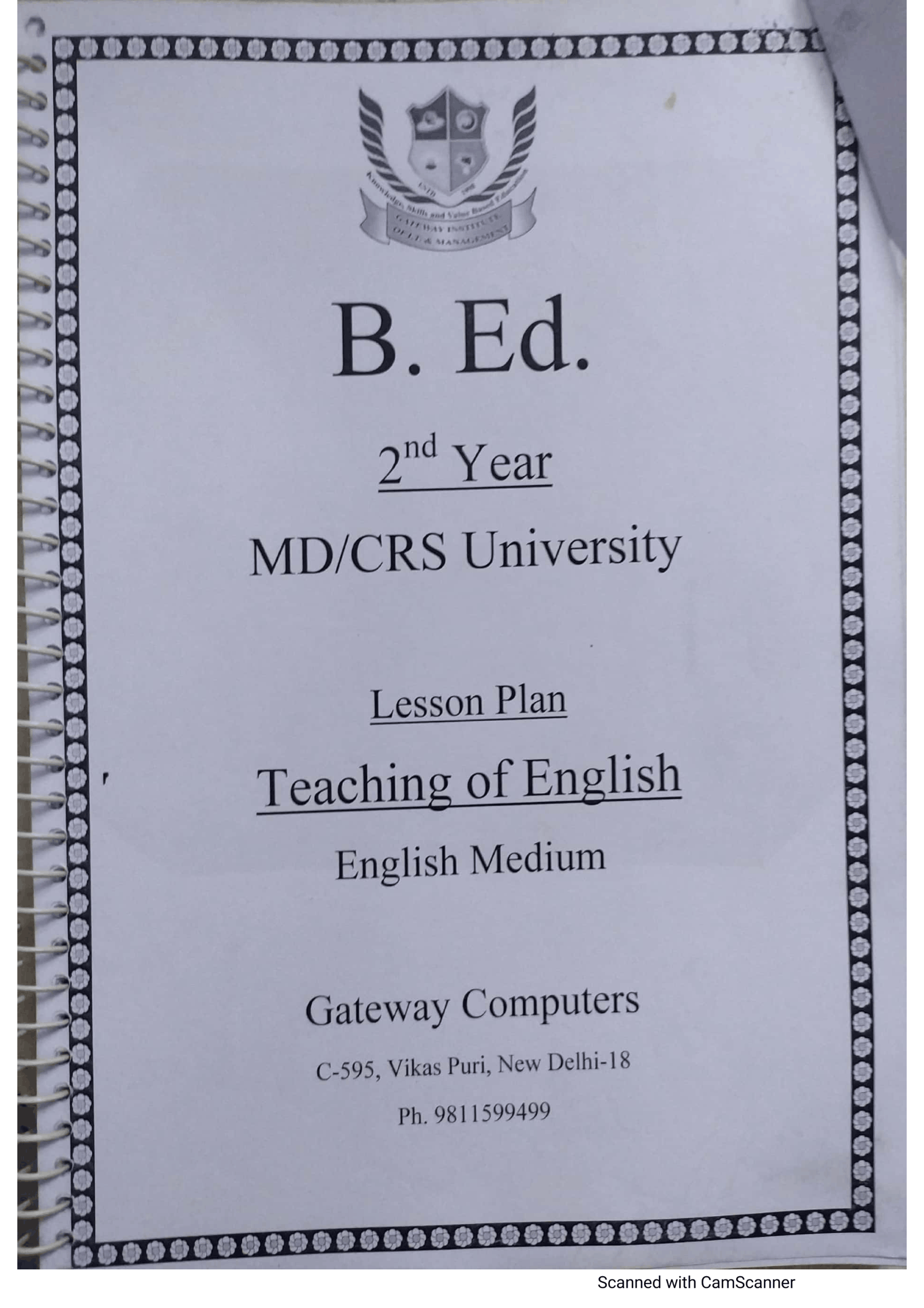
A real B.Ed 2nd Year Teaching of English lesson plan cover — note the standard stack: B.Ed, 2nd Year, MD/CRS University, Lesson Plan, subject line, English Medium.
What to Write on a B.Ed Practical File First Page
The B.Ed practical file first page follows a standard field set. Treat this as common practice rather than an official university template, and check your college's instructions .
- B.Ed level — written simply as "B.Ed" at the top.
- Year — 1st Year or 2nd Year (B.Ed runs on an annual scheme).
- University name — your university, written as it appears on your enrolment.
- File type — Lesson Plan, Practical File or Skill in Teaching.
- Subject and medium — for example Teaching of English, English Medium.
- Student name — your full name as registered.
- College roll number — issued by your college.
- University roll number — your university or board roll number.
- Session — the current session .
- College name — your college of education.
B.Ed 1st Year Practical File — Cover Page Format
In the 1st Year, the files usually cover EPC activities, micro-teaching and "understanding the self" work [VERIFY which files sit in 1st Year for your university]. The cover follows the same stack, with the year written clearly as 1st Year — never as a semester, since the scheme is annual.
So a 1st Year cover reads, top to bottom: B.Ed, 1st Year, your university, the file type, the subject where relevant, your name and roll numbers, and the session. For ready, correctly-worded covers you can copy in your own hand, see our b.ed 1st year practical file page.
B.Ed 2nd Year Practical File — Cover Page Format
The 2nd Year is where the Lesson Plan and teaching-subject files sit. The four real covers below all follow one stack: B.Ed, then 2nd Year, then MDU/CRS University, then "Lesson Plan", then Teaching of [Subject], then English Medium.
In practice this is the most common B.Ed cover students ask about. Keep the year, university and subject lines accurate and the file reads as ready. For the matching set you can use as a model, see our b.ed 2nd year practical file page.
B.Ed Practical File Front Page Format University Wise
The cover wording shifts a little by university and by the stationery used. Here are three real cover types side by side.
| University / cover type | File title used | Distinguishing front-page detail |
|---|---|---|
| Maharshi Dayanand University (MDU), Rohtak | Lesson Plan / Practical File | University rendered in full as "M D University Rohtak"; "Teaching of [Subject]" line with English Medium; seen here on a yellow decorative cover with the institute crest below the subject |
| Chaudhary Ranbir Singh (CRS) University, Jind | Lesson Plan | Shown as "MD/CRS University" on shared covers; explicit "2nd Year" line; crest at the top and the same field order |
| Pre-printed Skill-in-Teaching note-book (stationery) | Skill in Teaching Lesson Plan Note-Book | Blank fillable fields only — Name, Class, College Roll No, University/Board Roll No, Subject, Session 20__-20__ |
Other state and central universities, such as Teerthanker Mahaveer University or Bhagwan Mahavir University, follow a similar field set, so confirm your own university's exact wording before you write it .
A pre-printed Skill in Teaching Lesson Plan Note-Book cover — third-party stationery with blank fields, not a university-issued form.
Subject-Wise Front Page Samples
The four covers below are all B.Ed 2nd Year, MD/CRS, Lesson Plan, English Medium files, and they are not identical. Each has a detail worth copying correctly.
The Teaching of English cover (pictured above) uses the plain white stack with the crest at the top and an explicit 2nd Year line.
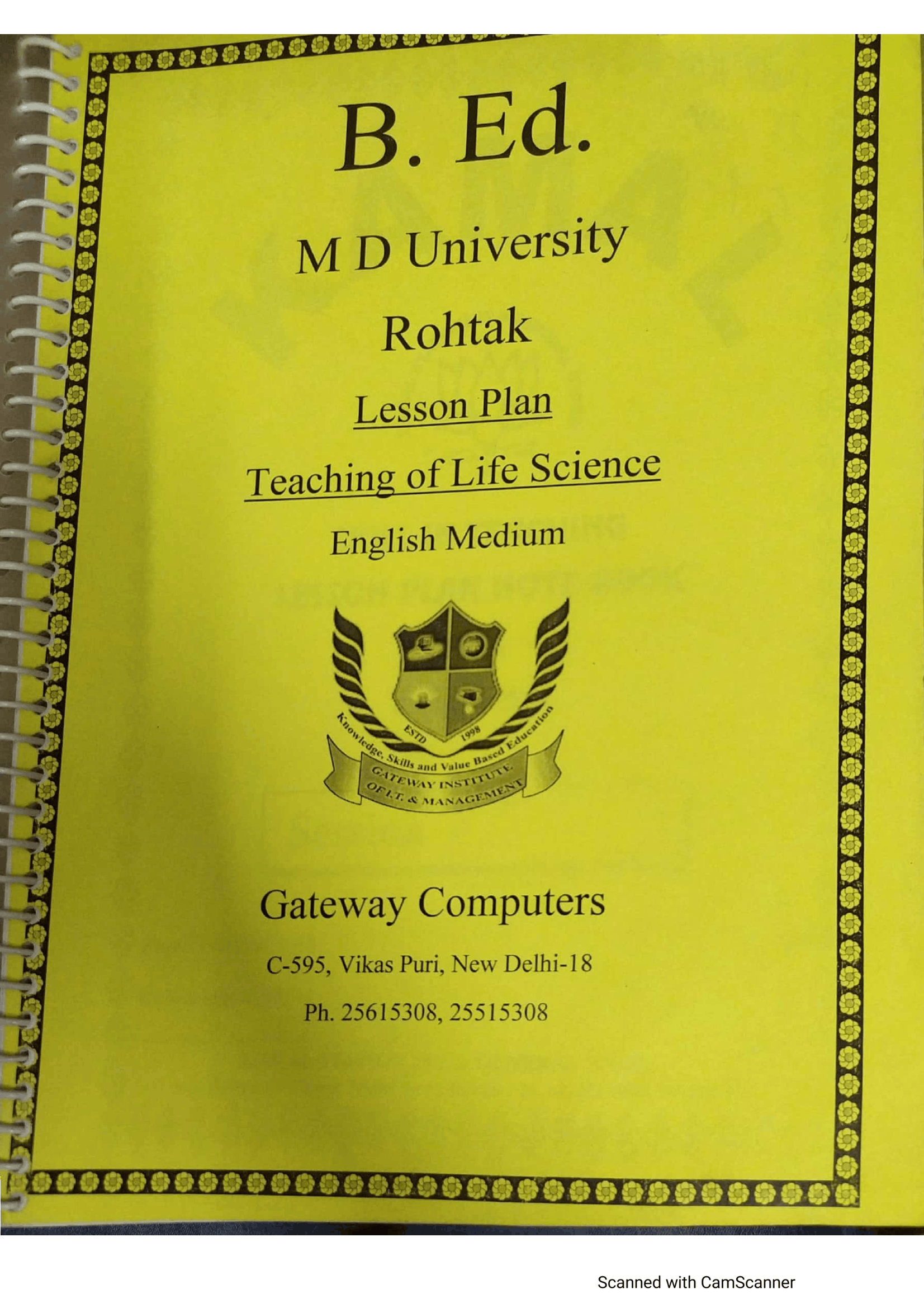
Teaching of Life Science — the standout: the university is written in full as "M D University Rohtak", on a yellow decorative bordered cover with the institute crest set below the subject line.
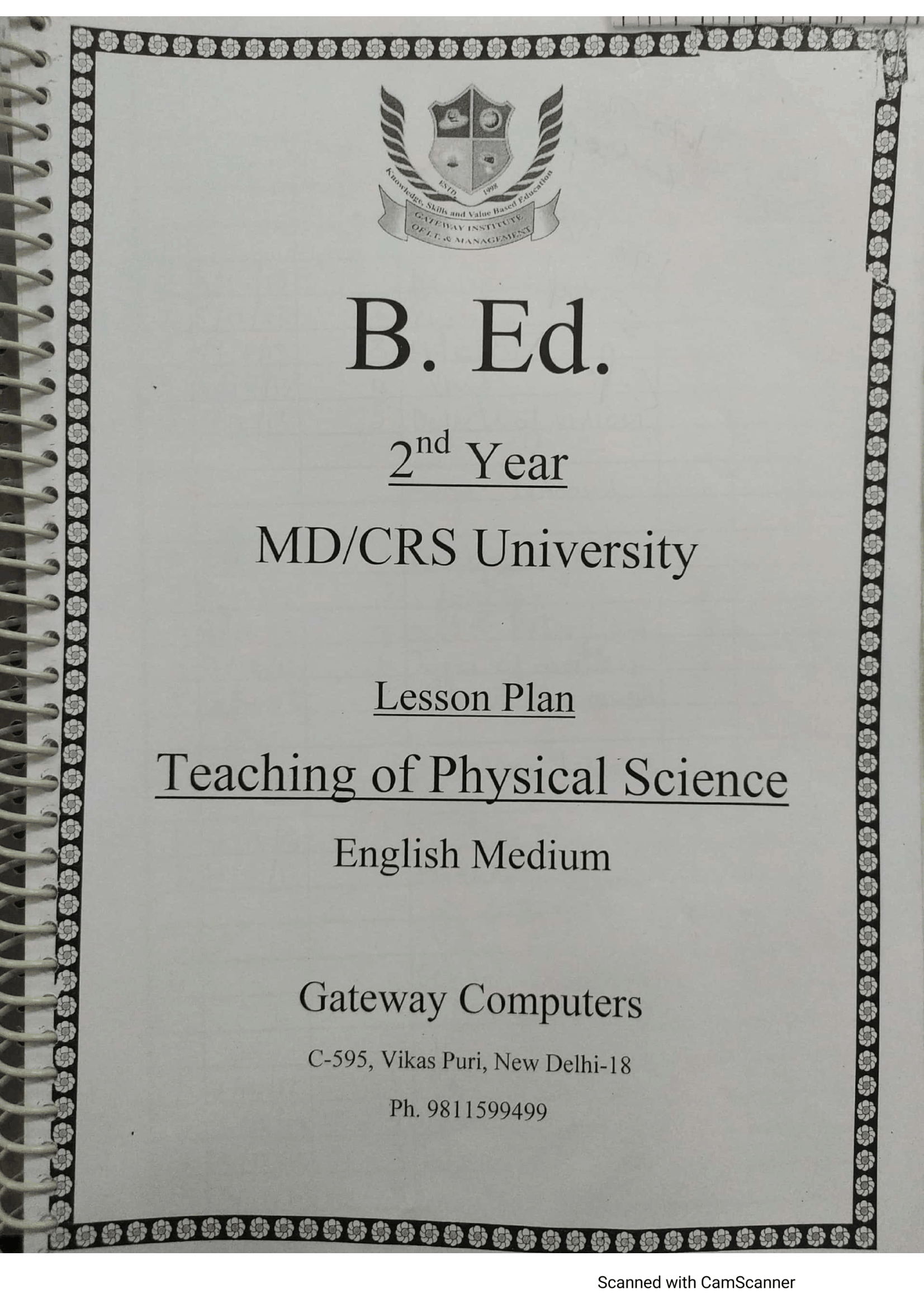
Teaching of Physical Science — the white MD/CRS stack; only the subject line changes from the English cover.
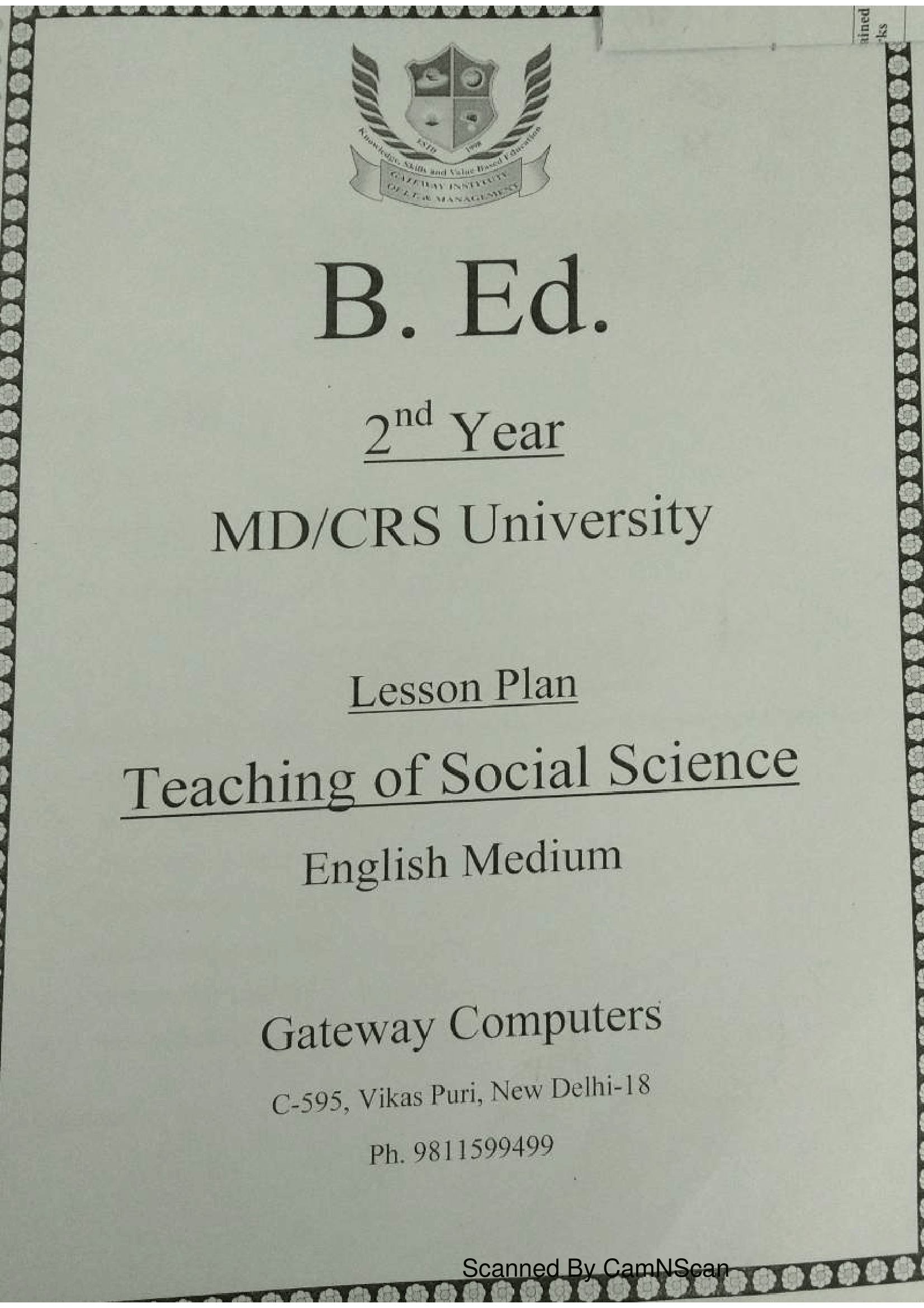
Teaching of Social Science — same white MD/CRS stack with a larger crest at the top and the Teaching of Social Science subject line.
The lesson here for most B.Ed students: the subject line and, on some covers, the exact university wording and cover colour change, so do not assume one sample fits every subject.
How to Make and Decorate a B.Ed Practical File Cover Page
Keep it neat and follow the order assessors expect.
- Decide handwritten or printed first, and match whatever your college asks for.
- Write the lines top to bottom — B.Ed, year, university, file type, subject and medium.
- Add your name, college roll number and university roll number below that.
- Write the current session and your college name.
- Keep margins straight and the text centred, with consistent capitalisation.
- Avoid whitener and overwriting — assessors notice a corrected, untidy cover.
- Check the year and university wording one last time before binding the file.
Common Mistakes to Avoid on the Front Page
Here's where files get returned, going by the covers we see most often.
- Wrong year labelling — writing "Semester" or the wrong year usually means a resubmission.
- Missing roll number — a missing college or university roll number can mean a mark deduction or a return.
- Wrong university name — the wrong or misspelt university name gets the file sent back.
- Mismatched subject or medium — a subject or medium that doesn't match the file inside triggers a resubmission.
- Overwriting and whitener — a corrected, messy cover looks untidy and quietly costs marks.
Ready Front Page Samples and Support
If you would rather start from a correct sample, Unnati Education B.Ed shares ready, correctly-formatted front-page samples for your university, year and subject as a no-cost preview. Use them as a reference and model only — you copy the cover in your own handwriting, and the file itself stays your own work.
Message us on WhatsApp at 9355198199 or 9899436484 with your university, year and subject, and we will guide you.
Frequently Asked Questions
What is written on a B.Ed practical file front page?
Your B.Ed level, year, university, file type, subject and medium, name, college and university roll numbers, session and college name. The exact wording varies by university.
Is the front page the same for 1st Year and 2nd Year?
The field set is the same; only the year line and the file or subject change. B.Ed uses 1st Year and 2nd Year, not semesters.
Does the B.Ed practical file front page change by university?
Yes. MDU covers often write the university in full as "M D University Rohtak", while shared covers show "MD/CRS University". Confirm your own university's wording.
What do College Roll No and University Roll No mean on the cover?
The college roll number is issued by your college; the university roll number is your university or board roll number. Both usually appear on the cover.
Can the front page be printed or must it be handwritten?
Both are common, but follow your college's instruction [VERIFY against college instructions]. Many colleges accept a printed cover with a handwritten file inside.
Which session should I write?
Write the current session . Update any sample that still shows an old "Session 20__-20__".
Unnati Education B.Ed is an independent academic support platform and is not affiliated with, endorsed by or an official body of Maharshi Dayanand University (MDU), Rohtak or Chaudhary Ranbir Singh (CRS) University, Jind. Always confirm current front-page rules, subject lists and the current session with your university and college. Material is shared for educational and revision purposes only.
Author: Sheetal Kirola, M.Ed., B.Ed — written and reviewed for the Unnati Education B.Ed desk. The format reflects standard B.Ed practical-file practice and the team's experience helping B.Ed students get covers accepted. Reviewed and updated for 2026.